
Affiliate Disclosure: Some links may be affiliate links. If you purchase through them, we may earn a commission at no extra cost to you.
It’s Monday morning. You open your inbox and see 847 unread emails. Your heart sinks. This is where email management AI becomes essential—not as a luxury, but as survival. Buried in that avalanche are probably important messages from your boss, critical client requests, and time-sensitive opportunities—but they’re drowning under newsletters you never read, automated notifications, and promotional emails you forgot you signed up for.
You’re not alone. The average office worker receives 121 emails per day and spends 13 hours per week just handling email tasks. Each email interruption steals 15-20 minutes of focus time, adding up to over 90 minutes daily recovering from distractions.
Here’s the good news: Email management AI combined with a proven one-time inbox reset can reclaim 15+ hours every week. And you don’t need to be a tech genius to make it work.
How Email Management AI Transforms Professional Productivity
Email isn’t going away. Daily global email traffic will grow from 392 billion in 2025 to 523 billion by 2030. Despite newer platforms like Slack and Teams, 41% of professionals still identify email as their single most effective communication channel—more than double the next category.
The problem isn’t email itself—it’s how we manage it.
Traditional strategies like “inbox zero” require constant vigilance and disciplined processing. They work beautifully if you can check email on your own schedule. But for most professionals, emails arrive faster than you can process them.
The cognitive load is crushing. Every unread email represents an unmade decision. Your brain tracks each one as an open loop, draining mental energy even when you’re not looking at your inbox.
The cost goes beyond time:
- Reduced productivity: Context-switching between email and deep work destroys concentration
- Missed opportunities: Important messages get buried under digital clutter
- Professional anxiety: The red notification badge becomes a source of stress
- Decision fatigue: Hundreds of micro-decisions about what to keep, delete, or respond to
- Reputation damage: Slow response times affect how colleagues and clients perceive you
The solution isn’t working harder—it’s working smarter by combining a strategic reset with email management AI automation.
The 5 Common Email Struggles (And Why Willpower Isn’t Enough)
1. The Avalanche Effect
Once you fall behind, catching up feels impossible. You promise yourself you’ll “get to it this weekend,” but by Monday, you’re even further behind. The backlog grows faster than you can process it.
2. The Fear of Deletion
What if you delete something important? That receipt for taxes? That message from a colleague about a project three months ago? This fear paralyzes decision-making and keeps you drowning in digital clutter.
3. Newsletter Addiction
You signed up for 47 newsletters with good intentions. You’ll totally read that weekly industry roundup. Except you never do, and they pile up like magazines in a waiting room.
4. The “I’ll Deal With It Later” Loop
You mark emails as unread to remind yourself to respond. Weeks later, those emails are still there, generating guilt. The longer you wait, the more awkward the response becomes.
5. Tool Overwhelm
You’ve tried Gmail filters, Outlook rules, productivity apps, and browser extensions. Each requires setup time, and none solve the underlying problem: too much email, too little time.
Why traditional advice fails: Most email management advice assumes you have time and mental bandwidth to implement complex systems. They tell you to “batch process emails twice daily” or “use the two-minute rule.” But when you’re already drowning, adding more rules creates more overwhelm.
This is where email bankruptcy shines—it acknowledges you’re too far behind to catch up through normal means and offers a legitimate fresh start.
The Email Bankruptcy Method: Your 15-Hour-Per-Week Reset
Email bankruptcy isn’t giving up—it’s a strategic reset acknowledging a simple truth: you will never catch up on 800+ old emails, so stop trying. Instead, archive them safely, respond to critical messages, and implement email management AI systems to prevent future pile-ups.
According to recent data, 63% of marketers now use AI tools for email, and 49.5% of email marketers acknowledge AI’s positive impact on automation efficiency. It’s time to bring that same efficiency to your personal inbox.
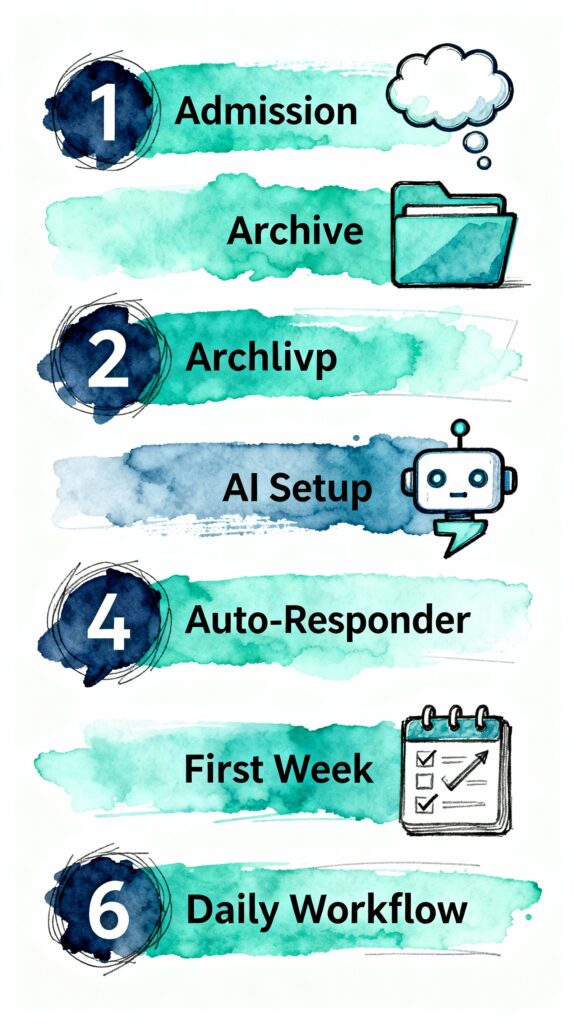
Step 1: Admit the Truth (5 minutes)
You’re too far behind to catch up through normal processing. That’s not a character flaw—it’s mathematics. If you receive 121 emails daily but can only properly process 80, you’re falling 41 emails behind every single day.
Action: Say it out loud: “I am declaring email bankruptcy.” Making it official creates psychological permission to move forward.
Step 2: The Safe Bankruptcy Process (30 minutes)
Do NOT just delete everything. That’s email bankruptcy done wrong.
A) Create a “Pre-Bankruptcy Archive” folder
- Gmail: Create a label called “Archive – Pre-[Today’s Date]”
- Outlook: Create a folder called “Old Inbox – [Today’s Date]”
- Apple Mail: Create a mailbox with the same naming convention
B) Rescue critical messages (15 minutes max)
Sort your inbox by sender. Quickly scan for:
- Your direct supervisor or key clients (respond to the 2 most recent from each)
- Time-sensitive keywords: “urgent,” “deadline,” “meeting today,” “ASAP”
- Messages from the past 7 days only
Important: Set a timer for 15 minutes. When it goes off, move to the next step even if you’re not finished. Perfectionism is what got you into this mess.
C) Bulk archive everything
- Gmail: Click the checkbox to select all, then “Select all conversations that match this search,” then Archive
- Outlook: Select all (Ctrl+A) and move to your Pre-Bankruptcy folder
- Apple Mail: Select all (Cmd+A) and move to your archive mailbox
Why archive instead of delete: You’ll have peace of mind knowing you CAN search for something if absolutely necessary, but it’s out of your daily view.
Step 3: Set Up the AI Safety Net (45 minutes)
This is where email management AI transforms from a one-time fix into a permanent solution.
A) Deploy an AI email assistant
For professionals needing inbox management and smart filtering, tools like SaneBox, Superhuman, or built-in AI features in Gmail/Outlook can automatically categorize emails and surface what matters.
If you need more advanced automation for drafting responses, <a href=”http://copy.ai?via=jaspreet&utm_source=blog&utm_medium=affiliate&utm_campaign=email_mgmt_ai” rel=”sponsored nofollow”>Copy.ai</a> can help manage routine correspondence. Benefit: Reduces email writing time by up to 30%. Caveat: Requires initial setup to train on your communication style and review AI-drafted responses before sending.
B) Create intelligent filters
Set up these essential filters:
- VIP Communications: Train your system to recognize your most important contacts
- Newsletter Quarantine: Auto-archive newsletters to a “Read Later” folder
- Automated Notifications: Route system notifications away from primary inbox
- Promotional Sweep: Segregate marketing emails into a weekly review folder
C) Implement the “3-3-3” notification protocol
- Check email only 3 times daily: morning (after deep work), midday, and end of day
- Spend maximum 30 minutes per session
- Handle only the 3 most important messages per session
Step 4: The Honest Auto-Responder (Optional, 3-7 days)
Consider an auto-responder that sets expectations:
“I’m implementing a new email management system to serve you better. I’ve archived past emails to reset my inbox. If you sent something time-sensitive that requires my attention, please reply with ‘URGENT’ in the subject line, and I’ll prioritize it. Thank you for your patience.”
Why this works: It’s honest without being defensive. It gives people a clear action path. And it filters out 90% of “did you see my email?” questions.
Step 5: The First Week Protocol
Days 1-3:
- Process new emails only using your 3-3-3 schedule
- Don’t touch the archived folder
- Trust that anyone needing an urgent response will reach out another way
Days 4-7:
- Same processing schedule
- Begin unsubscribing from newsletters you don’t read
- Fine-tune your AI filters based on what’s still slipping through
Week 2 onwards:
- Maintain your 3-3-3 schedule
- Do a weekly 10-minute “Old Archive” review only if you need to retrieve something specific
- Celebrate your empty inbox at the end of each day
Metrics to track:
- Hours spent on email per week (aim for 5-7, down from 13+)
- Time to inbox zero each session (aim for under 30 minutes)
- Number of “urgent” interruptions (should decrease as people adapt to your schedule)
Your AI-Powered Daily Email Workflow
Once you’ve completed the bankruptcy reset, maintain your freedom with email management AI assistance:
Morning (8:00-8:30 AM)
- Let AI assistant pre-sort overnight emails
- Review AI-drafted responses for routine inquiries
- Handle only VIP communications requiring personal attention
- Time saved: 30-45 minutes
Midday (12:30-1:00 PM)
- Quick 15-minute check for urgent items
- Let AI surface priority messages
- Defer everything else to end-of-day
- Time saved: 20-30 minutes
End of Day (4:30-5:15 PM)
- Process remaining inbox to zero
- Review and send AI-drafted responses
- Set up tomorrow’s priorities
- Archive processed items
- Time saved: 45-60 minutes
Weekly time reclaimed: 12-15 hours

Before and After: Real Time Savings
MetricBefore AIAfter AITime SavedDaily email checks15-20 times3 times~2 hoursEmail processing2.6 hrs/day1 hr/day1.6 hrs/dayResponse drafting45 min/day15 min/day30 min/dayFinding old emails20 min/day5 min/day15 min/dayWeekly total13 hours5 hours15 hours
The 5 Costly Email Management Mistakes
Mistake #1: Declaring Bankruptcy Without Prevention Systems
Wiping your inbox clean feels amazing—for about three days. Then you’re drowning again because you didn’t fix the underlying problem.
Fix: Implement AI filtering and the 3-3-3 protocol BEFORE you declare bankruptcy. The reset is useless without prevention.
Mistake #2: Using Too Many Email Addresses
“I’ll create separate emails for different purposes!” creates more complexity. You end up checking 5 inboxes instead of managing 1 effectively.
Fix: Use one primary email with AI-powered filtering and folders.
Mistake #3: Over-Relying on AI Without Review
AI drafts responses, but it doesn’t understand nuance, humor, or your specific relationships. Sending AI-generated emails without review can damage professional relationships.
Fix: Review every AI-drafted email before sending. Use AI to save drafting time, not replace your judgment.
Mistake #4: Not Training Your Network
You implement your 3-3-3 schedule, but colleagues and clients still expect instant responses. Their frustration grows, and you feel guilty.
Fix: Communicate your new email policy clearly. Set expectations with an auto-responder. Provide alternative contact methods for genuine emergencies.
Mistake #5: Forgetting the Archive Exists
You declared bankruptcy, archived everything, and now treat that folder like a black hole. When you actually need something, panic sets in.
Fix: Your archived emails are searchable. Most email platforms have powerful search functions. You can always find something if truly necessary.
Take Control: Your Next Steps
Email overload isn’t a personal failing—it’s a system problem requiring a system solution. Email management AI combined with the email bankruptcy method gives you that solution.
Your 30-day action plan:
- Week 1: Declare email bankruptcy using the safe process above. Set up basic AI filtering.
- Week 2: Implement the 3-3-3 protocol. Fine-tune your AI filters.
- Week 3: Deploy AI-drafted response templates for routine emails. Track your time savings.
- Week 4: Evaluate results. Adjust systems. Celebrate reclaiming 15+ hours of your life.
Ready to Implement AI Solutions That Actually Work?
Email management AI is just one piece of the productivity puzzle. At Chager.org, we help Canadian businesses and professionals implement AI safely, compliantly, and effectively.
Our services include:
- AI Implementation Consulting: Custom workflows for your specific role and industry
- Compliance Guidance: Quebec Law 25, HIPAA considerations, and privacy-first AI
- Training Programs: Turn your team into AI-literate power users
- Free Assessment Tools: 14 tools to audit your AI readiness and opportunities
👉 Explore our AI literacy services and free assessment tools: https://theleap.co/creator/Chager.org/
Not ready to commit? Start here:
- Take our AI Productivity Assessment (5 minutes)
- Download our AI Implementation Roadmap Builder
- Check our AI Tool Finder for vetted solutions
The bottom line: You don’t need to be a tech expert to reclaim control of your inbox. You need a proven method (email bankruptcy), smart prevention (AI tools), and realistic workflows (3-3-3 protocol). The 15 hours you save weekly? That’s time for strategy, deep work, family, rest—the things that actually matter.
Your inbox doesn’t have to be a source of chronic stress. Make 2025 the year you break free.
FAQs
Q1: Is email bankruptcy unprofessional or will it damage my reputation?
A: Email bankruptcy is a recognized productivity strategy used by executives and entrepreneurs worldwide. When done correctly with clear communication, it demonstrates you’re taking control of your workflow to serve others better. The key is transparency—let key stakeholders know you’re implementing a new system and provide alternative contact methods for urgent matters.
Q2: What if I delete something important during the email bankruptcy process?
A: The safe email bankruptcy method never involves deleting—you’re archiving, not erasing. All emails remain searchable in your archive folder. Modern email platforms have powerful search functionality, so you can retrieve specific messages when needed. The difference is these archived emails won’t clutter your daily workspace.
Q3: How do I choose the right AI email assistant for my needs?
A: Start by identifying your primary pain point: Is it drafting responses, filtering spam, or scheduling? For most professionals, built-in AI features in Gmail or Outlook handle 80% of needs at no extra cost. Evaluate paid tools only if you need advanced features. Always prioritize tools with clear privacy policies.
Q4: Can I use AI email tools if I work in a regulated industry?
A: Yes, but with restrictions. Never use AI tools on emails containing Protected Health Information (PHI), financial account details, or other regulated data. Create separate email addresses: one for administrative/non-sensitive communications (where you can use AI), and one for sensitive information (no AI). Always review your organization’s IT policies first.
Q5: How long does it take to see results from implementing AI email management?
A: Most professionals see immediate relief after declaring email bankruptcy (within 30 minutes), but sustainable results require 2-3 weeks of consistent implementation. By Week 3, most users report saving 10+ hours weekly and achieving inbox zero daily. The first month is a learning period where you adjust systems based on what’s working.

Recent Comments